ENGR1050 C for Engineers
PROJECT: Seeing The Light (STL0)
OBJECTIVE
We commence on our exploration of the electronics kit, by creating and controlling an LED with a C program on our pi.
OBTAIN THE PROJECT FILES
To assist with consistency across all implementations, data files for use
with this project are available on lab46 as a grabit, or within the
class repository under the projects/ directory. Please copy the data to
your project directory in your private semester repository to begin work.
Please study any provided code or supporting documents, and look up, experiment, and ask questions on aspects that you do not understand.
TASK
Your task is to first study and understand what the provided code is doing. It is expected you will ask questions on discord to gain clarification.
After exploring, assembling, and testing the intended circuit, wire up 2 LED circuits, connecting each to a unique GPIO pin on the pi, adapt the provided C code to blink both of the LEDs on the circuit, showing both in different states as they cycle on/off at least once every second.
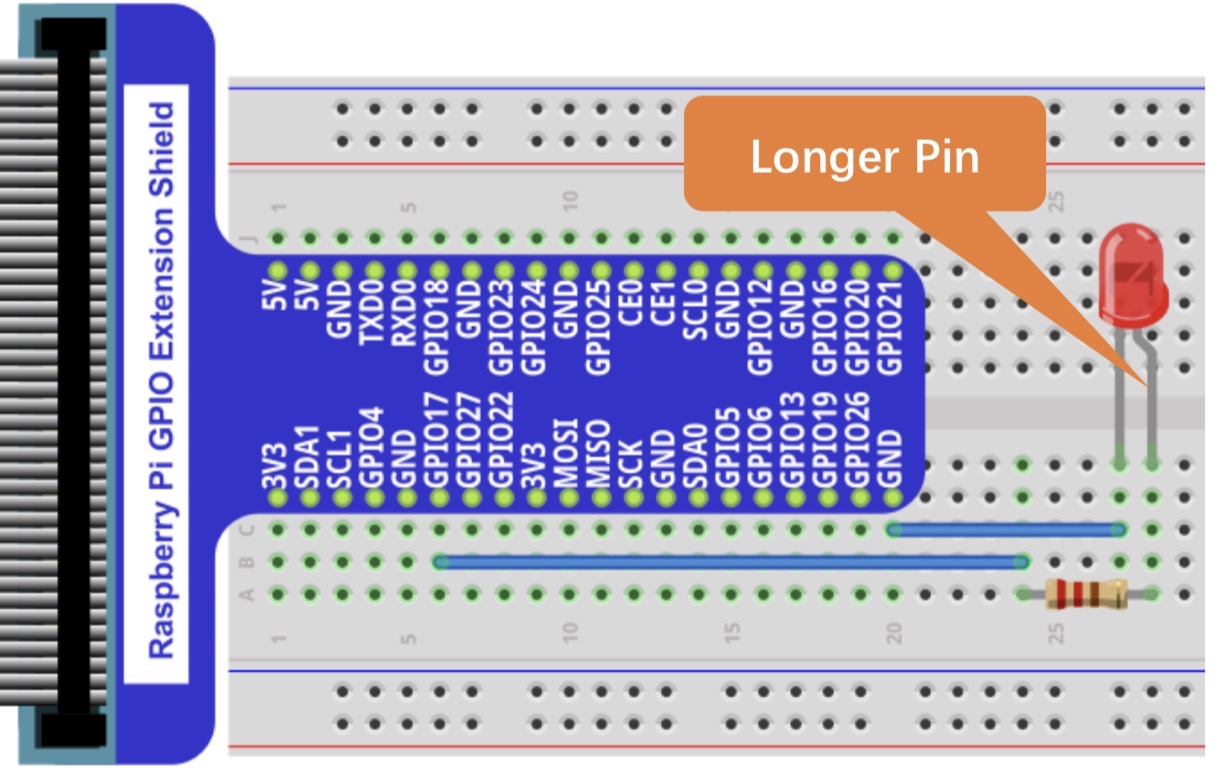
The circuits you will be constructing will be the same ones we previously built in class- an LED circuit receiving power (from a GPIO pin), having a 220 Ohm resistor, an LED, and then connecting to ground.
While we connected our initial circuits directly to a constant 3.3v supply, here we will be connecting them to GPIO pins, allowing for conditional supply of power, based on our code.
OPERATING THE PROJECT
These projects will have two paths to them, depending on which device you are using:
- Raspberry Pi single board computer (4/5) using the
wiringPilibrary - Raspberry Pi Pico microcontroller
lab46:~/SEMESTER/c4eng/stl0$ make
Please select which development environment:

  make wiringpi - using the Raspberr Pi with wiringpi library
  make pico     - using the Raspberry Pi pico

after which, you can use 'make' to build
lab46:~/SEMESTER/c4eng/stl0$
Run the make command with the category representing the path you will
be working with for this project.
After which, if you do an ls, you will see a cyan-colored file called
stl0.c. This is the C file you will be editing for this project.
Go ahead and view it, study the code, eventually make any changes, save and return to the command-line.
To build it, you simply run: make
If there are no errors, it will build, and you proceed from there.
EXECUTION
If on the pico, you will receive instructions on how to obtain your file.
If on the full Raspberry Pi, you have a green executable you can run just as we've done in our other projects.
SUBMISSION
To successfully complete this project, the following criteria must be met:
- Code must compile/execute cleanly (no notes, warnings, nor errors)
- Code must be nicely and consistently indented
- Code must be well commented
- Do NOT double space your code. Group like statements together.
- Track/version the source code in your private semester repository
To submit this project to me, make sure the Makefile and your completed
stl0.c file are placed in your private semester repository under
c4eng/stl0/
What I'll be looking for:
RUBRIC
I'll be evaluating the project based on the following criteria:
130:stl0:final tally of results (130/130)
*:stl0:post a picture or short video to the DISCORD [26/26]
*:stl0:code compiles without errors [26/26]
*:stl0:program conforms to project specifications [52/52]
*:stl0:code tracked in private semester repo [26/26]
Additionally:
- Solutions not abiding by spirit of project will be subject to a 50% overall deduction
- Solutions not utilizing descriptive why and how comments will be subject to a 25% overall deduction
- Solutions not utilizing indentation to promote scope and clarity or otherwise maintaining consistency in code style and presentation will be subject to a 25% overall deduction
- Solutions not organized and easy to read (assume a terminal at least 90 characters wide, 40 characters tall) are subject to a 25% overall deduction