ENGR1050 C for Engineers
PROJECT: Press The Button (PTB0)
OBJECTIVE
Revisiting our LED binary counter (with expanded capacity) from stl2, this time with buttons to control the count (up/down by one).
PROCESS
Do note, the productive way to go about this project involves taking the following steps:
- starting early
- reading the project page
- asking questions regarding things you do not know, are not clear on, or are confused about
- as information, concepts, processes become clear, that is something you can contribute to the project documentation (so you can better remember)
If you start too late, and do not ask questions, and do not have enough time and don't know what is going on, you are not doing the project correctly.
OBTAIN THE PROJECT FILES
To assist with consistency across all implementations, data files for use
with this project are available on lab46 as a grabit Please copy the
data to your private semester repository under an appropriate project
directory to begin work.
The project should be obtained by the Sunday prior to the due date.
lab46:~/SEMESTER/c4eng$ grabit c4eng ptb0Please study any provided code or supporting documents, and look up, experiment, and ask questions on aspects that you do not understand.
OPERATING THE PROJECT
These projects will have two paths to them, depending on which device you are using:
- Raspberry Pi single board computer (4/5) using the
wiringPilibrary - Raspberry Pi Pico microcontroller
lab46:~/SEMESTER/c4eng/ptb0$ make
Please select which development environment:

  make wiringpi - using the Raspberry Pi with wiringpi library
  make pico     - using the Raspberry Pi pico

after which, you can use 'make' to build
lab46:~/SEMESTER/c4eng/ptb0$
Run the make command with the category representing the path you will
be working with for this project.
After which, if you do an ls, you will see a cyan-colored file called
ptb0.c. This is the C file you will be editing for this project.
Go ahead and view it, study the code, eventually make any changes, save and return to the command-line.
To build it, you simply run: make
If there are no errors, it will build, and you proceed from there.
MAINTAINING YOUR REPOSITORY
Be sure to keep your repository up-to-date, regularly committing changes to files.
As a reminder, here are the suggested steps:
-1. make clean <– remove all unnecessary files
-
git status<– see the current state of things -
git pull<– pull down any changes from elsewhere -
git add<– add each new or modified file 2a.git add ./<– try this the first time -
git commit -m "your message"<– make a snapshot git push
TASK
Taking our knowledge of LEDs and buttons:
- wire up the 10 element LED bar to individual wiringPi GPIOs (have 8-10 usable LEDs for the count)
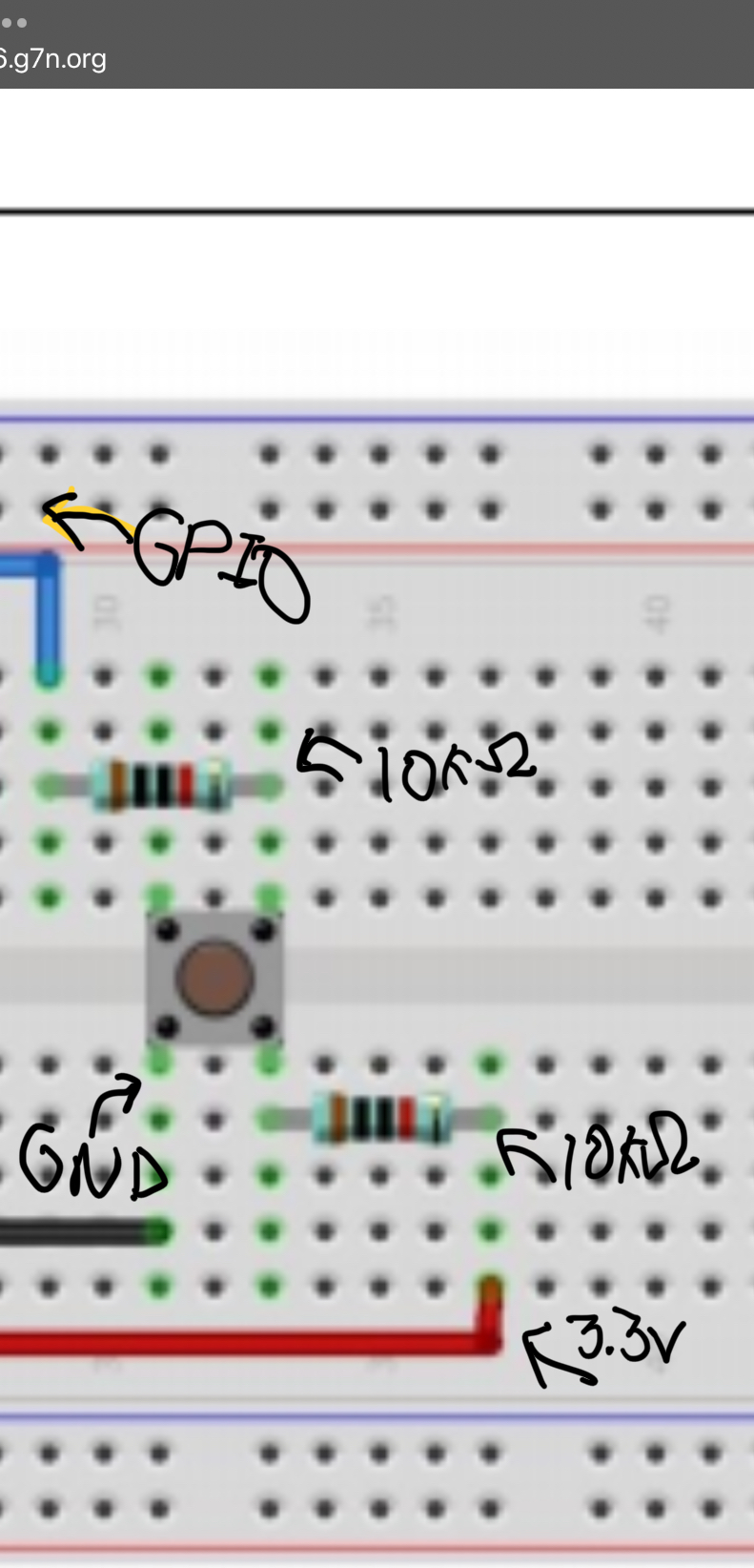
- wire up 2 buttons to individual wiringPi GPIOs
- one button will be the increment button, increasing the value of the count by 1
- one button will be the decrement button, decreasing the value of the count by 1
- unless a button is pressed, the count remains on the current value
- when the increment button is pressed, the count proceeds to count up by 1
- when the decrement button is pressed, the count proceeds to count down by 1
The value of the count is to be displayed in binary on the LED bar. If "1" means the LED in that position is ON, and "0" means the LED in that position is OFF, then a count of 5 would appear as:
0 0 0 0 0 0 0 1 0 1Pressing the increment button would advance the display to:
0 0 0 0 0 0 0 1 1 0while pressing the decrement button would instead bring it back to:
0 0 0 0 0 0 0 1 0 0The LED circuits you will be constructing are the same ones we built in stl2: an LED circuit receiving power (from a GPIO pin), having a 220 Ohm resistor, an LED, and then connecting to ground, using the 10 segment LED bar (ten individual LEDs packaged into one component). Remember you still need to hook up resistors to each LED.
Each LED circuit will be powered from a unique GPIO pin, allowing for conditional supply of power, based on our code. Likewise, each button will be connected to its own unique GPIO pin, which your program will read to determine whether that button is currently being pressed.
As in stl2, you will use a loop where your use of if statements has been optimized so you're not writing a case for each possible state, but instead bit positions / place values. Consider also what should happen at the edges of your count (such as decrementing below zero, or incrementing past the largest value your LEDs can show), and document your decision in your comments.
EXECUTION
If on the pico, follow the process for downloading the binary file and programming your pico.
If on the full Raspberry Pi, you have a green executable you can run just as we've done in our other projects.
STRATEGY
The general flow of the process (one way of going about it, anyway) can be described as follows:
SET COUNT TO ZERO
REPEAT INFINITELY:
    SHOULD THE INCREMENT BUTTON BE PRESSED:
        INCREMENT COUNT BY ONE

    SHOULD THE DECREMENT BUTTON BE PRESSED:
        DECREMENT COUNT BY ONE

    BIT POSITION IS ONE
    LED OFFSET IS ZERO
    REPEAT AS LONG AS LED OFFSET IS LESS THAN TEN:
        SHOULD THE CURRENT BIT POSITION HAVE A ONE:
            ACTIVATE THE LED AT CURRENT OFFSET
        OTHERWISE:
            DEACTIVATE THE LED AT CURRENT OFFSET

        LEFT SHIFT BIT POSITION BY ONE
        LED OFFSET IS INCREMENTED BY ONE

    DELAY AT LEAST FIFTY MILLISECONDS

REPEAT BLOCK
SUBMISSION
To successfully complete this project, the following criteria must be met:
- Code must compile/execute cleanly (no notes, warnings, nor errors)
- Code must be nicely and consistently indented
- Code must be well commented
- Do NOT double space your code. Group like statements together.
- Track/version the source code in your private semester repository
To submit this project to me, make sure the Makefile and your completed
ptb0.c file are placed in your private semester repository under
c4eng/ptb0/
What I'll be looking for:
RUBRIC
I'll be evaluating the project based on the following criteria:
208:ptb0:final tally of results (208/208)
*:ptb0:used grabit to obtain project by the Sunday prior to duedate [13/13]
*:ptb0:clean compile, no compiler messages [13/13]
*:ptb0:post a picture or short video to the DISCORD [26/26]
*:ptb0:each LED hooked to a unique GPIO [26/26]
*:ptb0:each button hooked to unique GPIOs [52/52]
*:ptb0:button state is read, on press code adjusts count [52/52]
*:ptb0:binary value of the count correctly displayed on LED bar [13/13]
*:ptb0:code tracked in lab46 semester repo [13/13]
Additionally:
- Solutions not abiding by spirit of project will be subject to a 50% overall deduction
- Solutions not utilizing descriptive why and how comments will be subject to a 25% overall deduction
- Solutions not utilizing indentation to promote scope and clarity or otherwise maintaining consistency in code style and presentation will be subject to a 25% overall deduction
- Solutions not organized and easy to read (assume a terminal at least 90 characters wide, 40 characters tall) are subject to a 25% overall deduction